Getting Started With Docker
Learn about basic docker fundamentals and containerization basics which can help you deploy your application faster than ever 🚀🚀

👋 Hi, I'm Dharm Joshi, a passionate Full-Stack Engineer with over 2 years of experience in the tech industry. My expertise lies in modern JavaScript frameworks and libraries such as ReactJS ⚛️, NodeJS 🟢, ExpressJS, and Meteor.js ☄️. On the backend, I work extensively with databases like MongoDB 🍃 and PostgreSQL 🐘, utilizing ORMs like TypeORM and Mongoose 🦝 for efficient data handling. In addition to development, I'm well-versed in cloud technologies ☁️, including Docker 🐳, Kubernetes 🛠️, and AWS ☁️, where I’ve successfully deployed scalable MERN stack applications to AWS EC2 instances. I aim to continuously evolve my skills, building robust and performant web applications.
Introduction 🐧
Docker is a tool used to automate the deployment of applications in lightweight containers so that applications can work efficiently in different environments in isolation.
It is a free, open-sourced toolkit that helps you to package your application into a container, with all dependencies and configurations making the deployment of the application hassle-free and faster than the traditional way of deployment.
Containers in docker 📦
The container is a way to package all the necessary dependencies, configurations and any other system requirements that are required to run an application on a server.

Containers are portable artifacts that can be easily shared and moved around. All the containers in docker are either in the private repository of an organization or can also be in a public repository provided by docker known as DockerHub.
Now using docker containers we can improve our application development and deployment process. Let's see it by an example.
Let's say I am developing a big e-commerce platform which uses React framework as frontend and NodeJS as backend. In this project, I have some developers working on different features both on the backend and frontend. Now, I am maintaining a git repository for this project and everything is working fine on my local machine which has NodeJs version 15 and ReactJs version 14.
Now I give this repository access to the operations team with some artifacts of how to deploy it on the production server. Now due to some human error, I forgot to write the compatible versions of NodeJs and ReactJs (of course we have package.json but we are creating a scenario here of human error ).
Due to this human error, my operations team installed NodeJs version 18 and ReactJs version 18 on the production server which is on Linux. Due to this version difference of frameworks my e-commerce website crashed. Now it will be down till we don't fix the version incompatibility issue, which will cause me a great amount of loss in terms of my sales.
In this scenario, due to a human error made by me, my production goes down and also my website will be down till we fix this version incompatibility issue.
What if we can build some kind of package in which all the configurations, system requirements and other dependencies are already defined and we just need to run that package to start our production website?
Hurray🤩, we know right, we have something called as Containers in docker which will eventually solve this specific issue by packaging all necessary configurations and dependencies into it, and therefore nullify the human error in deploying the application.
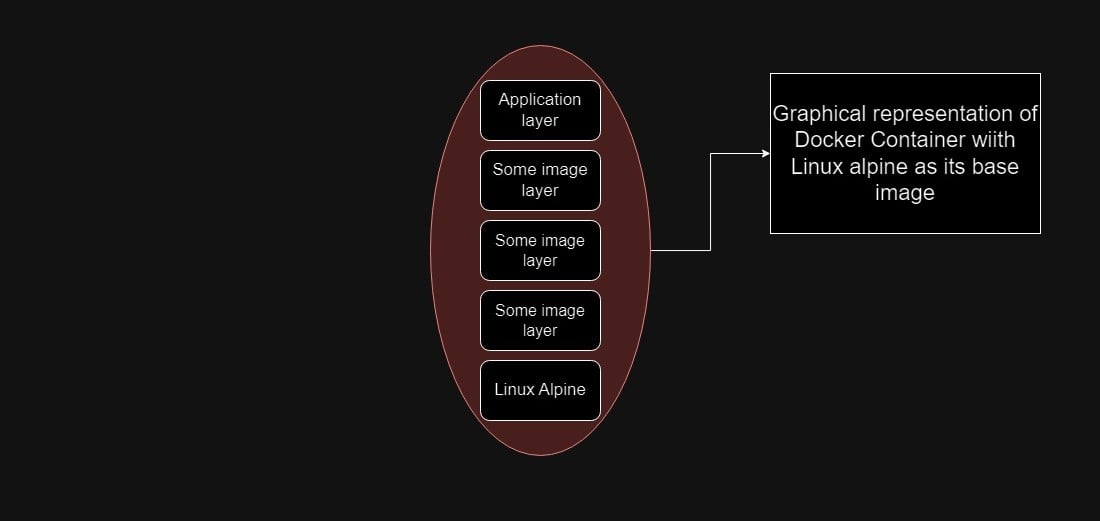
Now that we know, what is containers and why it is necessary, let's get into the technical side of containers in docker. Containers are basically Layers of images.
Mostly pre-build containers have Linux-alpine as a base image and on top of that, the image presents an application image layer that has information about the application configurations and dependencies.
Docker Image -VS- Docker Containers.
Generally, folks get confused about the basic difference between docker images and containers, so in this section, we will get that thing solved by discussing some basic differences between images and containers.
The actual artifact, which contains configurations of an application is called Docker Image
Now when you pull that image into your system or server and run it in an isolated environment, that is called a Docker Container
So in layman's terms, when the artifact is not running it is called Docker Image & When that image runs inside an isolated environment it is called Docker Container.
Layers in Docker image.

As you can see in the GIF, there are different layers topped with each other in that delicious cake 😳. In docker, we have something similar to that 🫡.
Docker images are made up of different layers. As we have discussed earlier, most of the docker images are made up of Linux Alpine as a base image. And are topped with some other important layers of other configurations and dependencies. But the question is Why docker images are divided into multiple layers?
The answer to that question is "Reusability of layers". When we work with Docker images, multiple intersecting layers are present in multiple different images provided by DockerHub. If we download intersecting layers every time a new docker image is pulled from DockerHub, it will be a very time-consuming as well as space-consuming operation as we are downloading duplicate dependencies each time when pulling a new docker image. Thus to sort of cache the already present dependencies or intersecting dependencies, a single docker image is divided into multiple layers.
So when you pull any docker image from DockerHub or your private repository, first it will check for the already present layers in your system/server, and then it downloads only the layers that are not present in your system/server.
Docker -VS - Virtual Machine.
As we have discussed a lot about docker till now, we need to look into some depth of how docker is different from a VM ( Virtual Machine ). This step is necessary to understand as it will also clear some of your doubts regarding the run environment ( On OS level ) of docker.
To understand the difference between Docker and VM, we first need to look at how the operating system works, Let's look into a diagram to understand more.
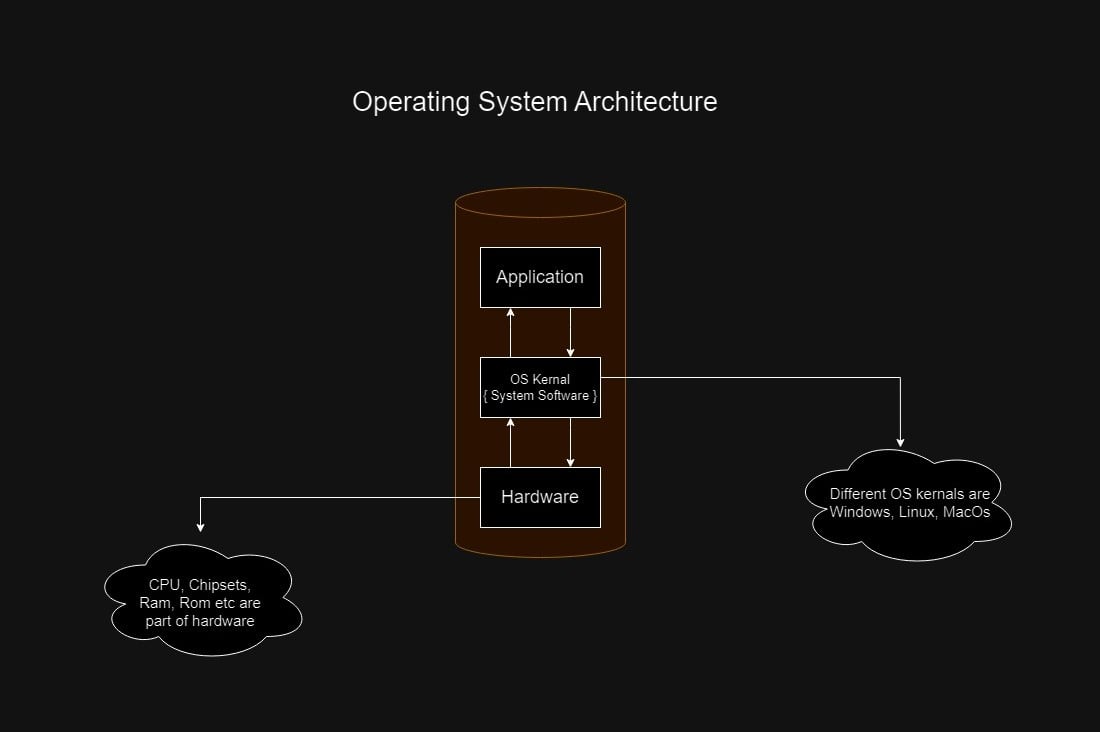
As per the above diagram, the bridge between hardware and application ( software ) is the OS kernel ( Windows or Linux or any OS ). This OS kernel interacts with both hardware and software and provides different abstractions to our whole operating system.
Now when we talk about Docker and virtual machines, they both follow the concept of virtualization, but their way of executing virtualization is somewhat different.
Docker images technically run on the application level of OS architecture. It means that the docker image will run on the host OS kernel of the system/server. It doesn't have its OS.
On the other hand VM ( Virtual Machine ) will run on both application and OS Kernel level, as each VM will have its own OS and it is independent of the host OS of system/server.
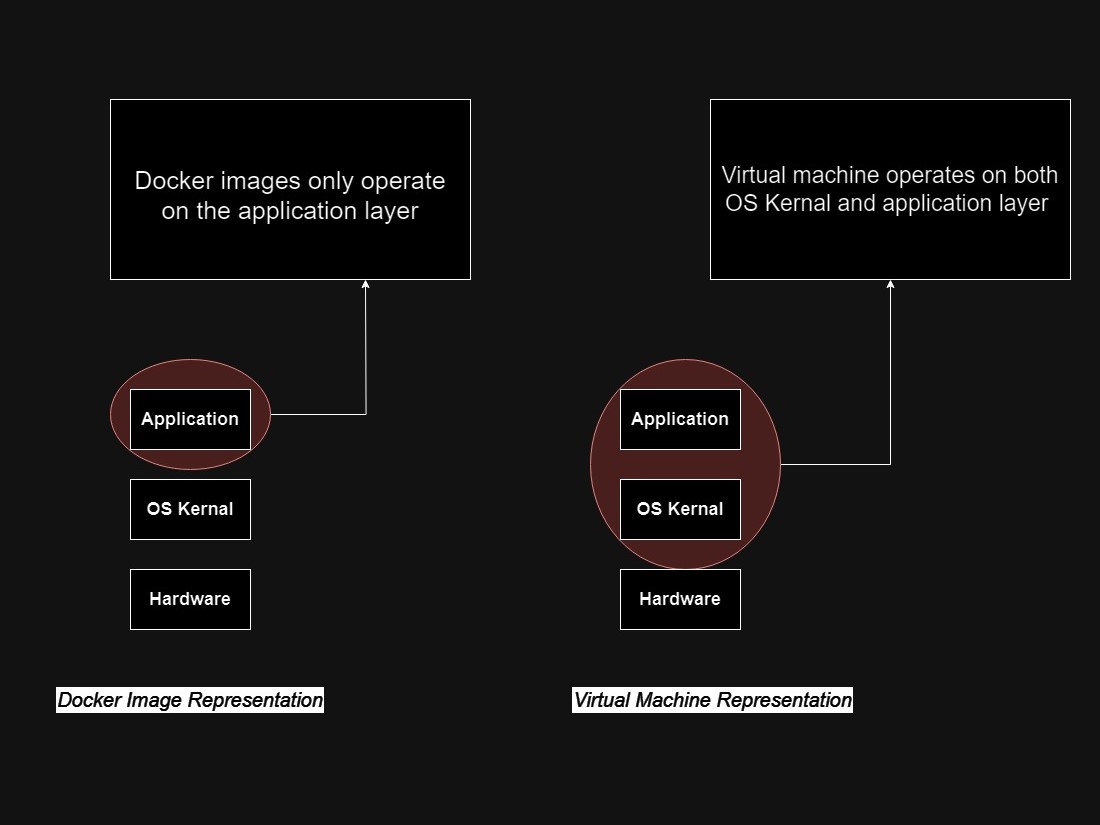
Due to these differences, Docker images are generally small in size ( in MegaBytes ) and VMs on the other hand are large ( in GigaBytes ). Docker images start and run faster as compared to VMs.
Conclusion 🔚
So, folks, we have reached at the end of this article. In this article, I have covered all the basics and some intermediate concepts of docker.
In the following articles, we will see some practical examples of working with docker, starting from installing docker into our local system to deploying our docker image to our private repository on DockerHub.
If you find this article helpful then leave a reaction, and in case you have any doubts or queries reach me at dharmjoshi01@gmail.com*.*
Thank you😊